64 Arrows Set
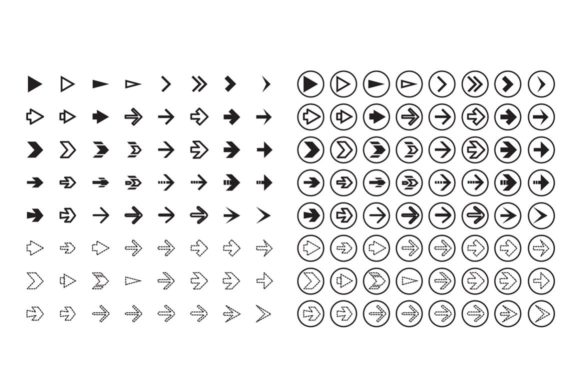
In the fast-paced world of graphic design, having access to a versatile and modern set of visual elements can make all the difference in creating compelling designs. The 64 Arrows Set is a powerful resource that offers designers a collection of 64 vector-based arrows, each crafted with a sleek, contemporary aesthetic. These arrows are not just decorative; they serve as functional tools for guiding attention, reinforcing directionality, and improving the clarity of visual communication. Whether you're working on a website layout, an infographic, or a brand identity system, this set provides the building blocks for creating strong, visually engaging content.
Why Modern Arrows Matter in Visual Design
Arrows are more than simple directional indicators—they play a crucial role in establishing visual hierarchy, guiding the viewer's eye, and enhancing the usability of digital and print materials. In modern design, where minimalism and clarity are key, the right arrow can elevate a project from average to exceptional. The 64 Arrows Set brings together a variety of styles and forms that cater to different design needs, ensuring that every designer has the right tool at their disposal.
Each arrow in the set is designed with clean lines and bold shapes, making them suitable for both high-contrast and subtle applications. This versatility makes them ideal for use across multiple platforms—from web interfaces to print collateral. Their scalable vector format ensures that they maintain quality at any size, which is essential for responsive web design and high-resolution print outputs.
Practical Applications Across Design Fields
The 64 Arrows Set is incredibly adaptable, offering value across a wide range of creative disciplines. Here are some of the most effective ways to use it:
- Branding and Logo Design: Use arrows to symbolize movement, progress, or innovation within a logo or brand mark.
- UI/UX Design: Incorporate arrows into navigation systems, buttons, and interactive elements to improve user experience and intuitive interaction.
- Social Media Graphics: Add arrows to call-to-action buttons, infographics, or promotional visuals to guide users toward engagement.
- Infographics and Data Visualization: Leverage arrows to indicate trends, sequences, or directional flows in complex data sets.
- Packaging Design: Use arrows to highlight product features, usage instructions, or directions for assembly.
With such a broad range of applications, the 64 Arrows Set becomes an essential part of any designer’s toolkit. Its inclusion of EPS and AI files also means that it integrates seamlessly into professional design workflows, allowing for easy customization and refinement in Adobe Illustrator 10 or newer versions.
Choosing the Right Arrow for Your Project
Selecting the appropriate arrow for a given context requires careful consideration of factors like style, scale, and color. For instance, a minimalist arrow may be better suited for a clean UI interface, while a bolder, more stylized version might work well in a dynamic advertising campaign. It's also important to ensure that the arrows align with your brand’s visual language and color palette for consistency.
When using these arrows, always consider how they interact with other design elements—such as typography, imagery, and layout—to maintain balance and visual harmony. A well-placed arrow can reinforce a message, while a misplaced one can confuse the viewer or disrupt the flow of the design.
Whether you're looking to streamline your workflow or enhance the visual storytelling in your projects, the 64 Arrows Set delivers a level of quality and flexibility that supports both creativity and professionalism. By integrating these assets thoughtfully, designers can create more impactful and cohesive visual experiences that resonate with audiences and support broader brand goals.